
The 12 Numbers That Predict Whether Your Practice Will Grow or Die Next Quarter.
Track the 12 growth metrics that reveal pipeline health, source quality, close rates, and leading indicators before next quarter’s results arrive.
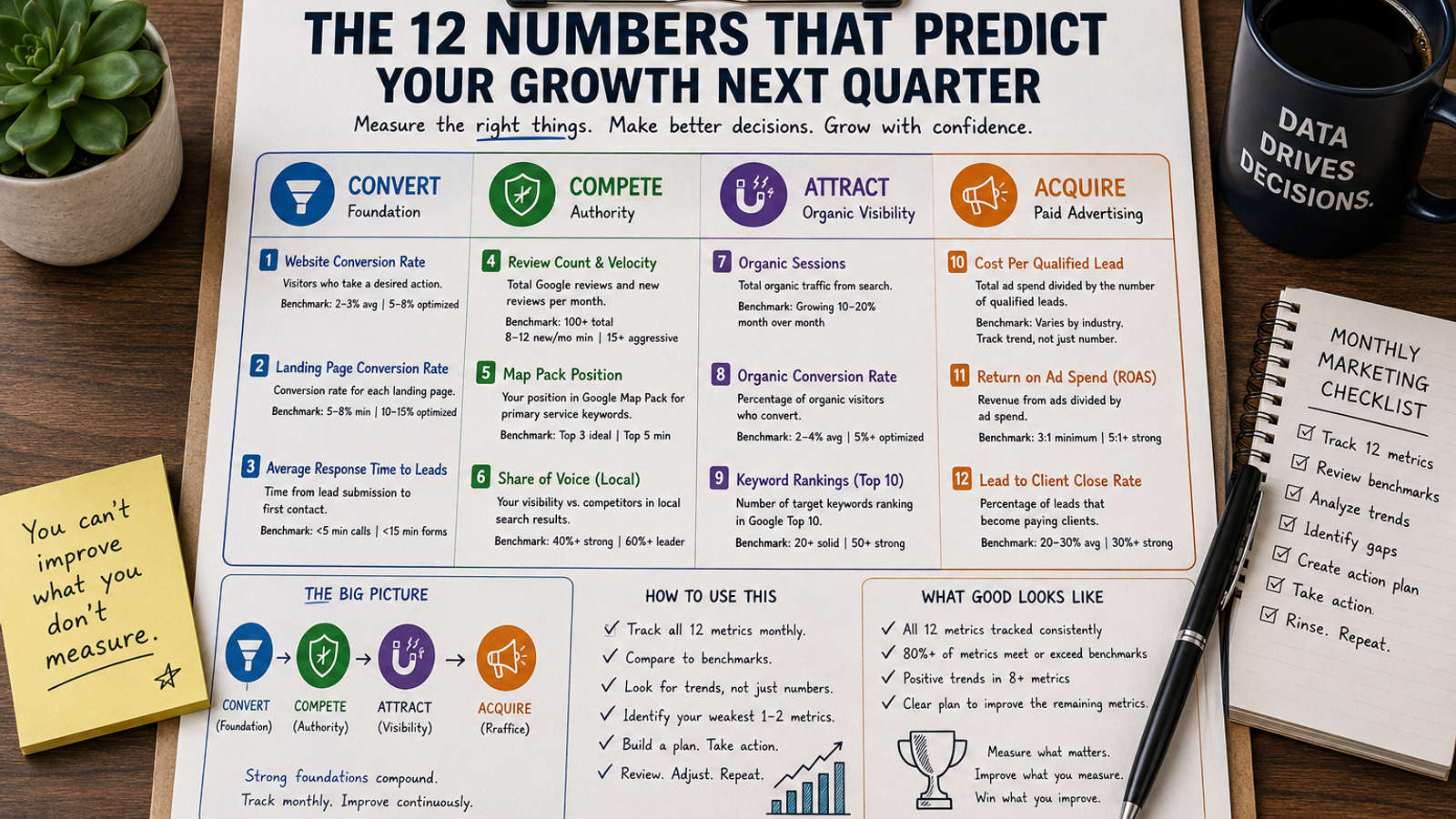
The 12 Numbers That Predict Whether Your Practice Will Grow or Die Next Quarter.
Quick. Tell me three numbers about your marketing right now.
If you're like most practice owners, you'll say something like: "We get about 800 visitors a month. We spend $5,000 on ads. We got 15 leads last month."
Those numbers tell you what happened. They don't tell you what's about to happen. They don't tell you whether next quarter will be better or worse. They don't tell you where to invest more or cut back. They don't tell you which channel is profitable and which is bleeding money.
They're lagging indicators. Rearview mirror numbers. By the time they tell you something is wrong, the damage is already done.
Last week, we showed you why your competitor gets 3x the leads from the same ad budget. This week, we're showing you the 12 numbers that actually predict growth. Not vanity metrics. Not ego metrics. Numbers that tell you what's about to happen 30, 60, and 90 days before it shows up in revenue.
This is Week 10 of our 12-week CAPTURE series. We're at the summit of CAPTURE, looking at how to measure everything we've built. Because what you don't measure, you can't improve. And what you measure wrong, you improve wrong.
Why Most Practices Track the Wrong Numbers
Here's what most professional service practices track.
Website traffic. (Vanity metric. More traffic from irrelevant searches doesn't generate leads.)
Total leads. (Misleading metric. 40 unqualified leads are worth less than 10 qualified ones.)
Ad spend. (Cost metric. Tell you what you paid, not what you got.)
Social media followers. (Ego metric. Followers don't pay bills.)
Email open rate. (Partial metric. Opens don't generate revenue. Clicks and conversions do.)
Google rankings. (Directional metric. Helpful, but rankings without conversion data don't predict revenue.)
None of these numbers are wrong to track. But none of them, alone or together, tell you whether your practice is growing or dying. They tell you about activities. They don't tell you about outcomes.
Here's what happens when you track the wrong numbers.
You feel good because traffic is up 30%. But you don't realize that traffic is up because of a viral social post that attracted people outside your service area. Zero of them will become clients.
You feel bad because ad spend increased 20%. But you don't realize that your cost per qualified lead dropped 35% at the same time. The campaign is more profitable, not less.
You feel indifferent because the lead count is flat. But you don't realize that lead quality improved dramatically. You're getting the same number of leads but 3x as many are qualified. Revenue is about to spike.
👉 Tracking the wrong numbers makes you feel confident about failing campaigns and anxious about winning ones. That's the danger of vanity metrics.
The fix isn't more data. It's the right data. Twelve numbers. Tracked monthly. Compared to benchmarks. Acted upon.
The 12 Metrics That Actually Matter
Here are the 12 metrics that predict growth for professional service practices. Grouped by the stage of the funnel they measure.
CONVERT Metrics (Foundation)
Metric 1: Website Conversion Rate
What to track: Percentage of website visitors who take a desired action (fill a form, call, schedule).
Benchmark: 2 to 3% is industry average. 5 to 8% is optimized. Below 2% is a problem.
Why it matters: This is your foundation. If this number is low, every dollar spent on traffic is wasted. We covered how to fix this in Weeks 1 to 3.
Metric 2: Landing Page Conversion Rate (by page)
What to track: Conversion rate for each dedicated landing page. Not just the homepage.
Benchmark: 5 to 8% minimum. 10 to 15% for well-optimized pages.
Why it matters: Landing pages are where ad traffic lands. If this number is low, your ads are underperforming regardless of how good the ad copy is.
Metric 3: Average Response Time to Leads
What to track: Time between lead submission and first contact attempt. Hours, not days.
Benchmark: Under 5 minutes for calls. Under 15 minutes for form fills.
Why it matters: Response time is a conversion multiplier. A lead contacted within 5 minutes is 21x more likely to convert than one contacted after 30 minutes. Most practices respond in 2 to 4 hours. That's 21x less effective than it could be.
COMPETE Metrics (Authority)
Metric 4: Review Count and Velocity
What to track: Total Google reviews and new reviews per month. Track velocity trend (increasing or decreasing).
Benchmark: 100+ total reviews. 8 to 12 new per month minimum. 15+ for aggressive growth.
Why it matters: Reviews drive map pack ranking, AI recommendations, and website conversion. We covered this in Week 8.
Metric 5: Map Pack Position
What to track: Your position in the Google Map Pack for your primary service keywords. Track weekly.
Benchmark: Top 3 for at least 50% of your target keywords.
Why it matters: Map pack position 1 gets 43.1% of clicks. Position 4 gets 6.1%. This is the difference between a full pipeline and an empty one.
Metric 6: Branded Search Volume
What to track: Number of monthly searches for your firm name (from Google Search Console).
Benchmark: Growing month over month.
Why it matters: Increasing branded searches mean your content, ads, and reviews are building awareness. People are seeing you somewhere and searching for you by name later. This is a leading indicator of pipeline growth.
CAPTURE Metrics (Pipeline)
Metric 7: Total Qualified Leads per Month
What to track: Leads that meet your qualification criteria (service area, case type, budget). Not all leads. Qualified leads only.
Benchmark: 20 to 40 per month for a $2M practice. 40 to 60 for a $5M practice.
Why it matters: This is your pipeline fuel. Track this number by source (organic, paid, referral, map pack) so you know which channels are working.
Metric 8: Cost Per Qualified Lead (by channel)
What to track: Total spend (ad spend + management fees) divided by qualified leads, broken down by channel.
Benchmark: Varies by industry. Law: $200 to $500. Medical: $150 to $400. Financial: $300 to $700.
Why it matters: This tells you which channels deserve more budget and which should be cut. If Google Ads generates qualified leads at $300 and Facebook generates them at $600, reallocate.
Metric 9: Lead-to-Consultation Rate
What to track: Percentage of qualified leads that schedule a consultation or meeting.
Benchmark: 40 to 60%.
Why it matters: If this number is low, your intake process has friction. Leads are interested but something in your follow-up process is losing them. Fix the intake, not the marketing.
Metric 10: Consultation-to-Client Rate (Close Rate)
What to track: Percentage of consultations that become paying clients.
Benchmark: 30 to 50% for professional services.
Why it matters: This is your sales effectiveness number. If it's below 30%, the problem isn't marketing. It's how you handle consultations. If it's above 50%, your marketing is generating highly qualified leads and your sales process is strong.
Metric 11: Cost Per Client Acquisition (by channel)
What to track: Total marketing spend divided by new clients, by channel.
Benchmark: Should be less than 25% of average client value. Ideally under 15%.
Why it matters: This is the ultimate profitability metric per channel. If your cost per client from Google Ads is $800 and your average client value is $5,000, your ROI is 525%. If your cost per client from Facebook is $2,500 and your average client value is $5,000, your ROI is 100%. Both are technically profitable. One is 5x more profitable.
Metric 12: Marketing Source Revenue (by channel)
What to track: Revenue generated from each marketing channel, attributed to the channel that originated the lead.
Benchmark: Organic should be growing as a percentage of total revenue. Paid should be stable or declining as a percentage as organic takes over.
Why it matters: This tells you the long-term health of your marketing. If 90% of your revenue comes from paid ads, you're renting your pipeline. If organic and referral are growing as a percentage, you're building equity. Your marketing becomes more profitable over time as organic compounds.
The Leading vs. Lagging Indicator Framework
Understanding the difference between leading and lagging indicators is what separates practice owners who predict growth from those who react to decline.
Lagging indicators confirm what already happened. Revenue, closed deals, total leads. By the time these numbers change, the cause happened weeks or months ago. You can't fix a lagging indicator. You can only observe it.
Leading indicators predict what's about to happen. Impression growth, review velocity, average position in search, landing page conversion rate, response time. These numbers tell you what's coming 30 to 90 days before it shows up in revenue.
Here's the mapping.
Lagging: Revenue. Leading: Consultation-to-client rate and lead-to-consultation rate. Lagging: Total leads. Leading: Impressions, keyword rankings, ad click-through rate. Lagging: New clients. Leading: Qualified leads, cost per qualified lead, review velocity. Lagging: Marketing ROI. Leading: Landing page conversion rate, cost per click, quality score.
👉 If your lagging indicators are flat or declining, the cause is in your leading indicators. Go back 30 to 60 days and find which leading indicator turned negative. That's your problem.
👉 If your leading indicators are trending positive but lagging indicators haven't moved yet, be patient. The lagging indicators will follow. This is the SEO compounding curve we covered in Week 7.
The Monthly Dashboard Template
Here's what your monthly marketing dashboard should look like. One page. Twelve numbers. Color coded.
CONVERT Section
- Website conversion rate: [X]% (Green if above 5%, Yellow if 2 to 5%, Red if below 2%)
- Landing page conversion rate: [X]% (Green if above 8%, Yellow if 5 to 8%, Red if below 5%)
- Average response time: [X] minutes (Green if under 15 min, Yellow if 15 to 60 min, Red if over 60 min)
COMPETE Section
- Review count / velocity: [X] total / [X] per month (Green if 100+ total and 8+ per month, Yellow if 50 to 100 total or 4 to 8 per month, Red if below 50 total or below 4 per month)
- Map pack position: [X] keywords in top 3 (Green if 50%+ of target keywords in top 3, Yellow if 25 to 50%, Red if below 25%)
- Branded search volume: [X] per month (Green if growing, Yellow if flat, Red if declining)
CAPTURE Section
- Qualified leads per month: [X] (Green if 20+, Yellow if 10 to 20, Red if below 10)
- Cost per qualified lead: $[X] (Green if below benchmark, Yellow if at benchmark, Red if above benchmark)
- Lead-to-consultation rate: [X]% (Green if above 50%, Yellow if 30 to 50%, Red if below 30%)
- Consultation close rate: [X]% (Green if above 40%, Yellow if 25 to 40%, Red if below 25%)
- Cost per client: $[X] (Green if under 15% of client value, Yellow if 15 to 25%, Red if above 25%)
- Revenue by channel: Organic [X]% / Paid [X]% / Referral [X]% (Green if organic growing, Yellow if flat, Red if declining)
👉 Print this dashboard. Put it on your wall. Review it on the first Monday of every month. If any number is red, that's your priority fix for the month. No exceptions.
How to Use These Numbers to Make Decisions
Data without decisions is just reporting. Here's how to turn each metric into action.
If website conversion rate is red: Stop all ad spend increases. Fix the landing page first. Sending more traffic to a page that converts at 1.2% is pouring money into a leaky bucket. Review Weeks 1 to 3 for the conversion optimization framework.
If review velocity is red: Build the review generation system from Week 8. This is the #1 ranking factor for map pack and AI recommendations. Fix it before anything else in COMPETE.
If lead-to-consultation rate is red: Your marketing is working. Your intake process is broken. Leads are coming in but your follow-up is losing them. Fix the intake process. Reduce response time. Add automated text follow-up. Train intake staff on objection handling.
If consultation close rate is red: Your leads are qualified and your intake is working. Your consultation process is the problem. Review how consultations are conducted. Are they structured? Do they address objections? Do they have a clear next step? This is a sales process issue, not a marketing issue.
If cost per client is red: Either your ad targeting is too broad, your landing page converts poorly, or your lead qualification is weak. Review Week 9 for the three-layer ad strategy. The fix is usually a combination of better landing pages, tighter targeting, and retargeting.
If organic revenue percentage is declining: Your SEO foundation is weakening. Either content production stopped, technical issues emerged, or competitors are outpacing you. Review Weeks 5 through 7 for the local SEO and content framework.
Each red number has a specific fix. Each fix traces back to a week in this series. That's not a coincidence. The C4 framework is a system. The metrics tell you which part of the system needs attention.
The CAPTURE Score Mini-Assessment
How well do you measure what matters?
1. Can you state your cost per qualified lead (not just cost per lead) for each marketing channel? Yes = 1 point. No = 0 points.
2. Do you track both leading and lagging indicators monthly? Yes = 1 point. No = 0 points.
3. Can you identify which marketing channel generates the most revenue (not just the most leads)? Yes = 1 point. No = 0 points.
4. Do you have a one-page dashboard with 12 or fewer key metrics reviewed monthly? Yes = 1 point. No = 0 points.
Score 0: You're flying blind. You have data but no insight. You're making budget decisions based on gut feel, not numbers. One dashboard away from clarity.
Score 1-2: You're tracking some of the right numbers but missing key ones. You have partial visibility. Enough to be dangerous but not enough to be strategic.
Score 3-4: You're measuring what matters. You can predict next quarter's performance from this month's leading indicators. The question is whether you're acting on what the numbers tell you.
CAPTURE Myths
Myth: "I don't have time to track all these numbers. I need to focus on running my practice."
Truth: You don't have time not to. One hour per month reviewing 12 numbers saves you thousands of dollars in wasted marketing spend. A practice owner who doesn't know their cost per qualified lead is like a surgeon who doesn't check vitals before operating. You're making decisions blind. The dashboard takes 60 minutes to review. The cost of not reviewing it is 60 hours of wasted marketing spend every month.
This Week's Action Item
This takes 30 minutes. Do it this week.
Write down the 12 metrics listed above. For each one, write down what you think the current number is. Your best guess.
Now, find the actual numbers. Pull them from Google Analytics, Google Search Console, your CRM, and your ad platform. Compare your guesses to reality.
The gap between what you thought and what's real is your blind spot. That blind spot is where the budget is being wasted and opportunities are being missed.
If 8 or more of the 12 metrics are numbers you don't currently track, that's your answer. You're making marketing decisions on assumptions, not data. Build the dashboard. Start tracking. Review monthly.
If 4 or more metrics are in the red zone, you know where to focus. Don't try to fix everything at once. Pick the one red metric that has the highest revenue impact. Fix it this month. Then move to the next.
What's Coming Next
Next week, we're tying the entire CAPTURE system together. The full picture. How TARGET, ATTRACT, and ACQUIRE work as one integrated growth engine. We'll walk through a complete case study of a practice that implemented the full system over 12 months, showing the timeline, the metrics at each phase, and the compounding results.
Week 11 will show you what 12 months of disciplined implementation looks like in real numbers. Not theory. Results.
We'll also be going deeper on all of this in our live workshop, "CAPTURE: Fill Your Pipeline With Qualified Prospects" on November 4. We'll share registration details as we get closer. We'll review live dashboards during the session so you can see what a fully optimized practice's metrics look like compared to yours.
Your Next Step
You can keep guessing at your marketing performance. Or you can build a dashboard that tells you exactly what's working, what's broken, and what to fix next.
👉 Run the Metrics Diagnostic and see which of the 12 key metrics you're tracking, which you're missing, and what each one reveals about your marketing health.
🔎 Download The Capture Blueprint for the complete 12-metric dashboard template, the benchmark guide for each metric by industry, and the decision framework that turns each red number into an action plan.
Your competitors who track these numbers are making decisions with clarity. The question is whether you'll join them or keep guessing.
Most agencies add more marketing to a foundation that can't convert it. We fix the foundation first.
The C4 Framework™ finds your biggest gap before we touch anything else, then builds the system that multiplies results. See the full methodology, the math, and what it's produced for firms like yours.